In the world of networked systems, every device needs an identifier. For developers, testers, and cybersecurity professionals, simulating these identities is a critical yet often overlooked step. This is precisely where IPv4 and IPv6 Address Generators become indispensable tools, streamlining workflows and safeguarding real-world environments.
Imagine building a global application, testing firewall rules, or simulating network traffic without risking your production infrastructure. IP address generators let you do just that, creating realistic, valid IP addresses on demand for a myriad of essential tasks. They are not just random number creators; they are strategic assets for anyone operating in the digital realm.
At a Glance: Why IP Address Generators Matter
- Essential for Development: Test application logic, IP validation, and geolocation features without using live data.
- Boosts Network Security: Simulate network conditions, test firewall rules, and train staff on threat detection with realistic, anonymized logs.
- Ensures Privacy: Anonymize sensitive datasets by replacing real IP addresses with generated, fictitious ones.
- Supports Education: Gain hands-on understanding of IP address structures, formats, and network addressing schemes.
- Versatile Tool: Generates both the older IPv4 and the newer, more expansive IPv6 addresses to suit any scenario.
The Digital Identifiers: IPv4 and IPv6 – A Quick Primer
Before diving into generators, let's establish a foundational understanding of IP addresses themselves. An IP address, or Internet Protocol address, serves as a unique numerical label assigned to every device connected to a computer network – think of it as a street address for your laptop, smartphone, or server. This identifier is the backbone of digital communication, ensuring that data packets always find their correct destination across the vastness of the internet or within a private network.
We primarily deal with two versions of the Internet Protocol: IPv4 and IPv6. Each serves the same core purpose, but they differ significantly in their structure, capacity, and the problems they were designed to solve. Understanding these differences is key to appreciating why generators offering both formats are so valuable.
Why You Need IP Address Generators: Beyond the Basics
Why bother generating IP addresses when your devices already have them? The simple answer lies in control, safety, and scale. Relying on real-world IPs for testing, especially in sensitive environments, can introduce unnecessary risks, privacy concerns, and operational complexities. IP address generators offer a sandboxed environment where you can manipulate network identities at will.
Consider a scenario where you're developing an application that needs to handle incoming requests from various geographical regions. Manually configuring machines with different public IPs for testing is impractical and often impossible. An IP generator quickly provides the diverse address types you need to simulate these conditions, validating your application's logic without ever touching a real network. It's about empowering innovation while maintaining security and efficiency.
Demystifying IPv4: The Internet's Workhorse (and Its Limits)
IPv4, or Internet Protocol version 4, has been the backbone of the internet for decades. It's the version most people are implicitly familiar with, even if they don't recognize the name. At its core, IPv4 uses 32-bit numerical addresses, typically presented as four decimal numbers separated by periods – for instance, 8.8.8.8 or 192.168.1.1.
This 32-bit structure allows for approximately 4.3 billion unique addresses. While that number might sound enormous, the exponential growth of internet-connected devices – from smartphones and smart TVs to IoT sensors and cloud servers – has led to a critical issue: IPv4 address exhaustion. We've essentially run out of new addresses to assign. This scarcity makes the transition to IPv6 not just an upgrade, but a necessity. Interestingly, IPv4 addresses also include a checksum field in their header, a small detail that impacts processing overhead compared to its successor.
Types of IPv4 Addresses: A Developer's Toolkit
Understanding the different categories of IPv4 addresses is crucial for effective network simulation and testing. An IP generator allows you to create specific types of addresses tailored to your exact needs.
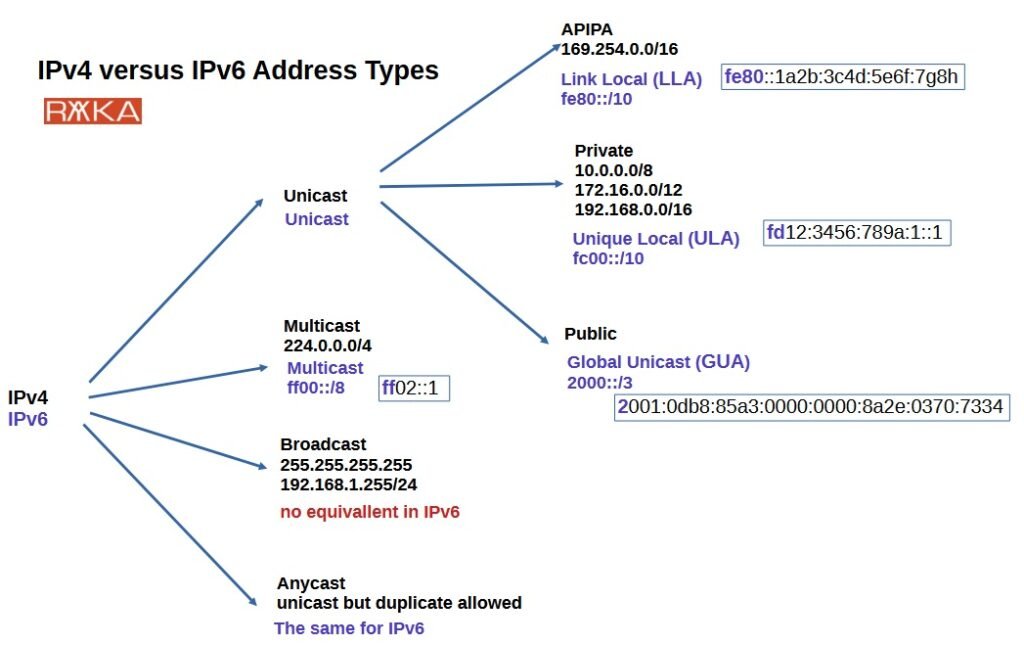
- Public IPv4 Addresses: These are globally unique identifiers assigned by Internet Service Providers (ISPs). Think of them as your actual home or office address on the global internet. When you access a website, your public IP is what the server sees. Generating public IPv4s allows you to simulate external network requests or test geolocation services within your application.
- Private IPv4 Addresses: Reserved for use within local networks, private IPs are not routable on the public internet. This means they cannot directly communicate with devices outside your local network. These ranges were a clever way to mitigate IPv4 exhaustion by allowing countless devices to share a single public IP through Network Address Translation (NAT).
- Class A:
10.0.0.0to10.255.255.255– Often used in large organizations. - Class B:
172.16.0.0to172.31.255.255– Common for medium-sized networks. - Class C:
192.168.0.0to192.168.255.255– The ubiquitous range for most home and small office networks.
Generating private IPs is invaluable for testing internal network configurations, DHCP server behavior, or application interactions within a closed environment. - Loopback (Localhost) Addresses: The
127.0.0.0/8range, with127.0.0.1being the most common, allows a device to refer to itself. This is critical for testing applications locally, enabling communication between different software components running on the same machine without involving the physical network interface. It's your personal testing ground. - Link-Local (APIPA) Addresses: Falling within the
169.254.0.0/16range, these addresses are self-assigned by a device when it's unable to obtain an IP address from a DHCP server. They allow communication only on the local network segment. Testing how applications behave when a DHCP server is unavailable, or configuring peer-to-peer connections in a limited context, often involves generating link-local IPs. - Multicast Addresses: The
224.0.0.0/4range is dedicated to multicast communication, where a single packet is sent to a group of receivers simultaneously. This is essential for applications like streaming video, online gaming, and certain network discovery protocols. Simulating multicast traffic helps test the efficiency and reliability of such applications.
Embracing the Future: Understanding IPv6
IPv6, the latest iteration of the Internet Protocol, is designed to succeed and eventually replace IPv4. Its most striking feature is its massive address space. While IPv4 uses 32 bits, IPv6 employs 128-bit numerical addresses. This expansion results in a staggering number of unique addresses – approximately 340 undecillion (340,282,366,920,938,463,463,374,607,431,768,211,456), which essentially guarantees a virtually inexhaustible supply for the foreseeable future.
IPv6 addresses are formatted differently, appearing as eight groups of four hexadecimal digits separated by colons, such as 2001:0db8:85a3:0000:0000:8a2e:0370:7334. This structure might look more complex, but the underlying principles remain the same: unique identification and efficient routing. A notable difference from IPv4 is that IPv6 does not include a checksum field in its header. This seemingly minor change actually reduces processing overhead for routers, contributing to improved network efficiency and performance.
IPv4 vs. IPv6: A Head-to-Head Comparison
Understanding the core distinctions between these two protocols is vital for anyone working with network configurations or application development. Here’s a quick breakdown:
| Feature | IPv4 | IPv6 |
|---|---|---|
| Address Length | 32 bits | 128 bits |
| Notation | Decimal (0-255 per octet) | Hexadecimal (0-9, A-F) |
| Separators | Dots (.) | Colons (:) |
| Address Count | ~4.3 billion | ~340 undecillion (virtually unlimited) |
| Checksum Field | Yes, in header (for error checking) | No, relies on lower-layer protocols for error checking |
| Address Exhaustion | Significant problem, leading to scarcity | Not an issue, vast address space |
| Primary Use | Legacy and current internet infrastructure | Future-proof internet infrastructure, IoT, cloud |
| This table highlights why IP address generators must support both standards. Depending on the environment you're testing or the application you're building, you'll need to generate addresses from either, or both, pools. |
Putting IP Address Generators to Work: Real-World Applications
The true power of an IP address generator lies in its practical utility. It's a versatile tool that addresses challenges across various technical disciplines.
1. Software Development & Testing
For developers, generating IP addresses is a fundamental component of robust testing strategies.
- Validating Input: How does your application handle malformed IP addresses? Does it correctly parse and store valid ones? A generator helps create a diverse set of valid and invalid IPs to stress-test your input validation logic.
- Log Parsing: Applications generate logs that often contain IP addresses. You can use generated IPs to create realistic log files, then test your log parsing scripts and ensure they accurately extract and interpret network activity.
- Geolocation Features: If your application offers features based on a user's geographical location (e.g., content delivery, localized pricing), you can use generated public IPs to simulate requests from different regions. This helps verify that your geolocation services and associated logic are working as intended.
- Access Control & Filtering: Test firewall rules, access control lists (ACLs), and rate-limiting features by generating a range of IPs that should either be allowed or blocked.
2. Network Simulation & Configuration Testing
Network engineers and administrators find IP generators invaluable for testing infrastructure without impacting live systems.
- Firewall Rules: Generate specific IP addresses or ranges to test the effectiveness of firewall rules. Can a simulated "malicious" IP access a protected resource? Does a permitted IP flow through as expected?
- Load Balancers: Simulate traffic from many different client IPs to test how a load balancer distributes requests across a server farm. This helps ensure even distribution and fault tolerance.
- DHCP Server Configurations: Validate that your Dynamic Host Configuration Protocol (DHCP) server correctly assigns IP addresses from its configured pools, handles requests, and manages leases by simulating client requests with generated IPs.
- Routing Protocols: Test routing tables and protocol configurations by simulating network segments with generated IP ranges.
3. Cybersecurity Training & Forensics
In the realm of cybersecurity, realistic data is paramount for effective training and analysis.
- Threat Detection: Create mock log files populated with generated IPs to simulate various attack scenarios (e.g., brute-force attacks from different source IPs, port scans). This allows security teams to train on detecting anomalies and responding to threats in a safe environment.
- Forensic Analysis: Practice incident response and forensic analysis by working with synthetic datasets containing generated IPs. This helps hone skills in tracking suspicious activity and identifying attack vectors without compromising actual sensitive data.
4. Data Anonymization & Privacy Protection
With growing concerns around data privacy, IP generators play a crucial role in safeguarding sensitive information.
- Privacy-Preserving Testing: When working with datasets that contain real user IP addresses, you can replace these with generated, fictitious IPs. This allows developers and testers to work with realistic data structures while complying with privacy regulations like GDPR or CCPA, protecting user anonymity.
- Public Data Sharing: Before sharing datasets publicly for research or analysis, anonymizing IP addresses ensures that individual users cannot be traced or identified, promoting responsible data practices.
5. Educational Purposes & Learning
For students and newcomers to networking, IP generators offer a hands-on way to grasp complex concepts.
- Understanding IP Structures: Visually observe and analyze the format of IPv4 and IPv6 addresses, helping to solidify understanding of their components, classes, and ranges.
- Network Design Concepts: Experiment with different subnets and IP allocation schemes by generating addresses for various simulated network segments.
To take advantage of these powerful capabilities, you'll want a reliable tool. Explore our IP generator to see how easy it is to create the exact addresses you need for your projects.
Choosing and Using an IP Address Generator Effectively
Not all IP address generators are created equal. While many online tools exist, the best ones offer a combination of flexibility, reliability, and ease of use.
Key Features to Look For:
- IPv4 and IPv6 Support: Absolutely essential for modern network environments.
- Address Type Selection: The ability to specify public, private (Class A, B, C), loopback, link-local, or even multicast addresses gives you precise control over your generated data.
- Quantity Control: Whether you need a single IP or a list of hundreds (some advanced generators can provide up to 50 at once), the tool should allow you to specify the number of addresses.
- Instant Copy/Download: Easily copy results to your clipboard or download them in a common format (like a CSV) for seamless integration into your scripts or spreadsheets.
- Validity Guarantee: The generator should only produce valid IP addresses according to the respective protocol standards.
Best Practices for Using Generated IPs:
- Understand Your Needs: Before generating, clearly define why you need the IPs and what type of IP addresses are appropriate for your specific testing or simulation scenario.
- Range Awareness: When generating private IPs, be mindful of the specific ranges (e.g., 192.168.x.x for home networks) if you need to simulate specific environments.
- Validation is Key: Even with a reliable generator, if you're building an application that processes IPs, always include your own validation logic. Generated IPs are useful for testing this very logic.
- Documentation: If you're using generated IPs in complex test scripts or anonymized datasets, document the purpose and source of these IPs.
Pitfalls to Avoid:
- Using Generated IPs for Real Traffic: Never attempt to use generated IP addresses for actual internet communication outside of strictly controlled, isolated testing environments. They are for simulation, not for becoming a device's actual network identity in a live setting.
- Ignoring Protocol Differences: Don't interchangeably use IPv4 and IPv6 addresses where only one is expected or supported by your system under test. Pay attention to the distinction.
- Overlooking Edge Cases: While generators produce valid IPs, remember to manually consider edge cases like the first/last addresses in a subnet, or specific reserved addresses, for comprehensive testing.
Common Questions About IP Address Generators
Users often have practical questions when they start leveraging IP address generators. Here are some answers to common queries.
Are the IP addresses generated truly random?
Most generators aim for pseudo-randomness, meaning they use algorithms to produce sequences that appear random but are ultimately deterministic (given the same seed, they'd produce the same sequence). For most testing and simulation purposes, this level of randomness is perfectly sufficient and effectively unpredictable.
Can I use generated IP addresses to browse the internet anonymously?
No, absolutely not. Generated IP addresses are theoretical constructs for testing and simulation within isolated environments. They are not assigned to any physical network interface on the public internet. Attempting to use them for actual browsing would lead to connection failures. True anonymity requires dedicated VPN services, proxy networks, or the Tor network.
What's the difference between random and sequential IP generation?
While many generators focus on random IPs, some advanced tools might offer sequential generation.
- Random generation produces IPs that are scattered across the available address space, useful for simulating diverse, unpredictable traffic.
- Sequential generation creates IPs that follow a numerical order (e.g.,
192.168.1.1,192.168.1.2,192.168.1.3). This is useful for testing subnet ranges, network scanning tools, or scenarios where clients are expected to be from a contiguous block.
How secure are generated IPs for data anonymization?
When replacing real IPs with generated ones, the level of security depends on whether the generated IPs maintain any link or pattern to the original data. A good anonymization strategy involves replacing each real IP with a consistently generated fake IP (e.g., using a cryptographic hash) that cannot be reverse-engineered to the original, and ensuring the generated IPs themselves are arbitrary and do not reflect any real-world entities. The primary benefit is breaking the direct link to a real individual or device.
Do I need special software to use an IP generator?
Most basic IP generators are available as free web-based tools, meaning you only need a web browser. For more advanced needs, like generating very large lists or integrating directly into scripts, you might find command-line tools or libraries in programming languages (like Python's ipaddress module) that can achieve the same results.
Moving Forward: Harnessing the Power of IP Generation
In the complex landscape of modern networking and software development, the ability to rapidly and reliably generate valid IPv4 and IPv6 addresses is more than just a convenience – it's a strategic advantage. These tools empower you to:
- Accelerate Development Cycles: By quickly simulating diverse network conditions, you can test features thoroughly and catch bugs earlier.
- Enhance Security Posture: Create realistic training environments and validate your defenses against a range of simulated threats.
- Ensure Data Privacy: Protect sensitive user information while still enabling rigorous testing and analysis.
- Deepen Understanding: Provide practical, hands-on experience for learning and teaching fundamental networking concepts.
Whether you're building the next great application, hardening your network, or simply exploring the intricacies of internet protocols, an IPv4 and IPv6 address generator is an indispensable asset in your digital toolkit. Embrace it to build, test, and secure with confidence.